

Vanity/Custom URLS
Vanity/Custom URLS - How to setup your domain
There are two main ways to accomplish bringing Partner Fleet onto your domain:
- Subdomain
- Reverse Proxy
Subdomain
You can easily setup your Partner Fleet instance under one of you subdomains by having your IT team setup a simple DNS entry.
You will need to decide what the preferred subdomain is e.g.:
- partners.domain.com
- integrations.domain.com
- partnerhub.domain.com
- exchange.domain.com
Or any subdomain you want.
Setup
- Choose the subdomain name
- Send the subdomain name to your Partner Fleet rep
- Have your IT team create a
CNAMEDNS record to point your chosen subdomain to proxy.partnerfleet.app
Note:Use the explicit url of proxy.partnerfleet.app do not change that in any way!
If you are using a CDN, don't cache the login page!
You should not cache the login/admin pages. If you are using a CDN (for example Cloudflare), you will need to make a custom rule that does not cache the admin pages. If the admin pages were cached, the authenticity token is also cached and when we check if it’s a fresh authenticity token for log in, it will fail.
Below is one example of how you should configure it to work:
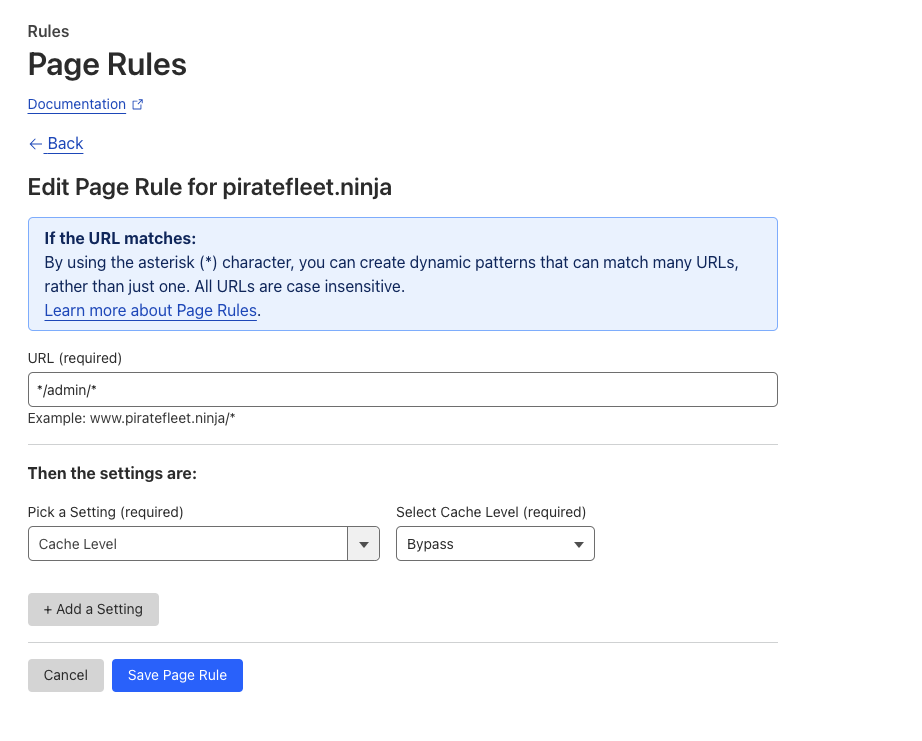
Reverse Proxy
You can setup Partner Fleet to live underneath your core domain behind a URL Path i.e. domain.com/partners or domain.com/hub. This will mean that all traffic to your core site will be routed to your core domain but all traffic to the /partners or /hub path will be routed to Partner Fleet.
This is a more complicated path as your team will need to create proxy rules to route all requests from /partners/ or /hub to route to Partner Fleet. This can be different depending on what system you use but generally will include the following steps:
- Create a rule to map all traffic to the path to Partner Fleet
- Create a rewrite function to set the host header as well as rewrite the url to remove the path
- Create a rewrite function to filter and update all URL and links on the page to refer to the correct URL & Path
Common solutions:
Updated over 1 year ago