

Webhook Setup
Webhooks Overview
What is a webhook?
A webhook (also called a web callback or HTTP push API) is a way for an app to provide other applications with real-time information. A webhook delivers data to other applications as it happens, meaning you get data immediately. This is unlike typical APIs in which you need to poll for data very frequently in order to get it real-time. This makes webhooks much more efficient for both provider and consumer. The only drawback with webhooks is the difficulty of initially setting them up.
We can integrate with the following systems:
Salesforce CRM
HubSpot (Marketing Automation, not CRM)
Pardot
This is not to say we cannot integrate with other systems, it will just take a bit of trial and error on our end.
Leads Webhooks Setup
Exact directions for your webhooks setup will vary based on which CRM or Marketing Automation tool you are using to send your leads. The typical process for setting up your webhooks will be to create a lead form that includes all the fields you are looking to gather. Place this lead form on a partner listing.
We have 2 different lead forms: on a Partner Listing level, normally for Partners, and on a Template level (for all partners related to that template), and this one is normally used for the Marketplace owners.
For Partner Listings Lead Form: In Admin go to Partner Listings > Partner Listings > Pencil Icon > Lead Form.
For Templates Lead Form: In Admin go to Partner Listings > Templates > Lead Form.
These 2 sections will be used to set the fields and mapping to your CRM or MA system fields (or your partners)
To gather the API names, inspect the landing page by Right-Clicking → Inspect. Hover over the fields, and look for “name=” in the code. Copy this API name and place it in the appropriate section within the Lead Webhooks and Lead Form section of Admin. By overriding the API Name, we are able to connect your system with Partner Fleet.
The standard lead fields that will be captured in every form fill include:
- First Name
- Last Name
- Company
Additional fields can be added by clicking Add One.
At the top, you will enter your Endpoint/Action URL. Most webhook integrations will use Form Data.
General Webhook Endpoints Setup
General webhooks will be used to create webhooks notifications for some events that happens in Partner Fleet, and you can subscribe your webhook to them. These are the events:
lead.status_changed: when a lead status changed
lead.created: when a lead is created
listing.active: when a listing is approved
listing.pending: when a listing is sent for approval
listing.rejected: when a listing is rejected
listing.created: when a listing is created
form.completed: when a form is submitted
form.rejected: when a form is rejected
user.created: when a user is created
user.role_changed: when a user role is changed
review.created: when a review is created
To create a General Webhook, make sure your plan with Partner Fleet has the webhooks and in your admin go to Configurations > Webhooks. Click "New Webhook" and the form below should appear:
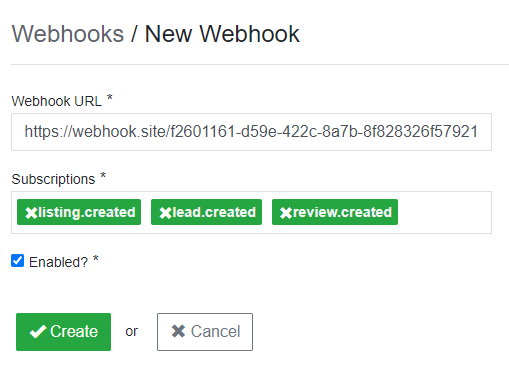
A Webhook URL is provided by the receiving application, and acts as a phone number that the other application can call when an event happens.
Subscriptions are the events and its how we notifies your endpoint when a variety of interactions or events happen, and you need to subscribe to them.
Make sure you check the Enabled? checkbox to start receiving your webhooks!
Click Create and that's it, your webhook should be ready!
Quick tip: a really good website to test the webhooks and how the payloads are formatted is this one: https://webhook.site/
.
.