

Enablement Marketplace
What is an Enablement Marketplace?
The Enablement Marketplace is an internal-facing partner content hub that can be embedded directly into sales enablement platforms such as Seismic, Highspot, or similar tools. It gives your internal teams (Sales, CS, Partnerships) access to curated partner program content — including SPIFFs, battle cards, enablement assets, partner tiers, and internal pricing — all within the tools they already use day to day.
This is different from a public marketplace. The Enablement Marketplace is designed for internal users only, allowing you to surface sensitive or sales-only partner information that should not be customer-facing.
Core Outcomes
When embedded into a sales enablement tool (e.g., Seismic, Highspot), the Enablement Marketplace allows internal teams to:
- Discover partner enablement content directly where they sell
- Access internal-only partner materials like SPIFFs, competitive battle cards, and partner program details
- Filter content by sales-relevant attributes (e.g., partner tier, commission rates, territories)
Control visibility based on roles and permissions to secure sensitive information
Workload Overview (What to Expect)
1. Planning & Configuration (30–90 minutes)
Before embedding, you’ll want to define:
- Which partner content should be internal-only
- How content should be organized using filters and taxonomy (e.g., Partner Tier, Incentive Type)
- Which internal teams should have access
Best practice: Align this structure to how Sales or CS teams already search for partner content inside tools like Seismic or Highspot
2. Partner Fleet Marketplace Setup (30–60 min)
Inside the Partner Fleet admin interface:
- Configure your Enablement Marketplace settings
- Create/assign internal taxonomy and custom sections
- Enable (or hide) sensitive content for internal use only
All content lives in Partner Fleet as a single source of truth — you simply control whether it appears publicly, in-app, or internally via the Enablement Marketplace.
3. Generate & Install the Embed Code (10–30 minutes)
Partner Fleet provides an iFrame embed snippet that can be added to any sales enablement platform that supports embedded content, including tools like Seismic, Highspot, or similar internal portals.
**High-Level Steps:
In Partner Fleet
- Go to Settings -> Marketplaces -> find your Enablement Marketplace
- Click on preview to copy the embed code.
- Copy the provided iFrame embed code
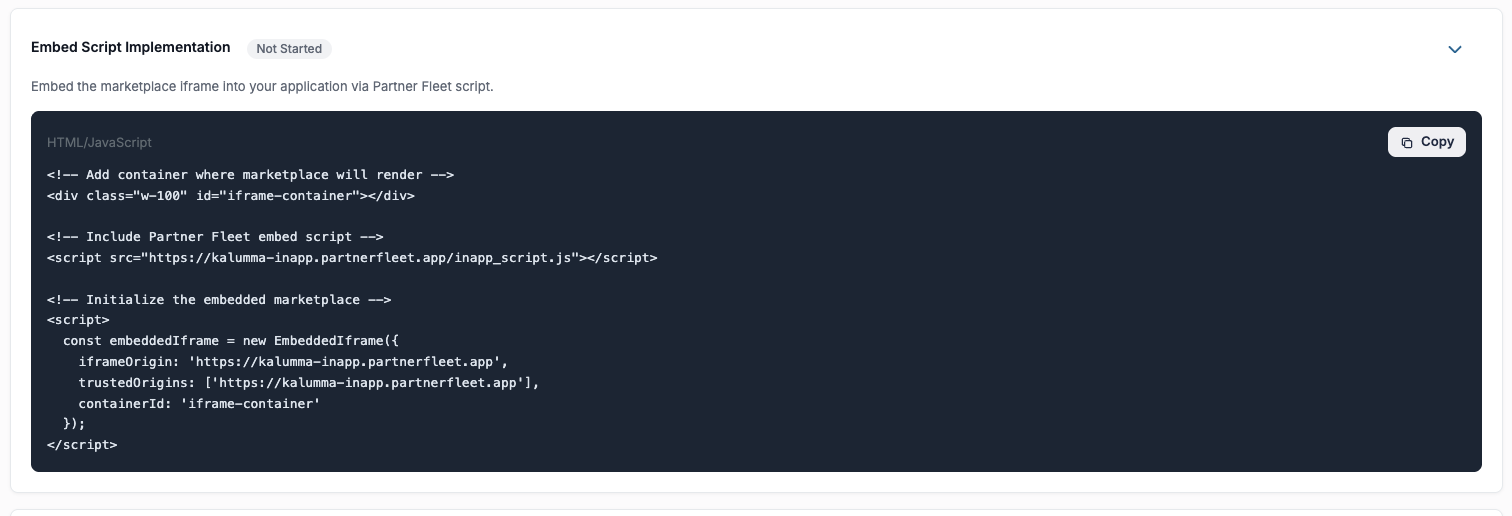
In Your Enablement Tool (e.g., Seismic, Highspot)
- Open the page, workspace, or content area where the marketplace should live
- Add a custom HTML / iFrame embed component
- Paste the Partner Fleet embed code
- Save and publish
Most modern enablement platforms support iframe-based embeds. If your tool supports embedded web content, Partner Fleet can be embedded without custom engineering.
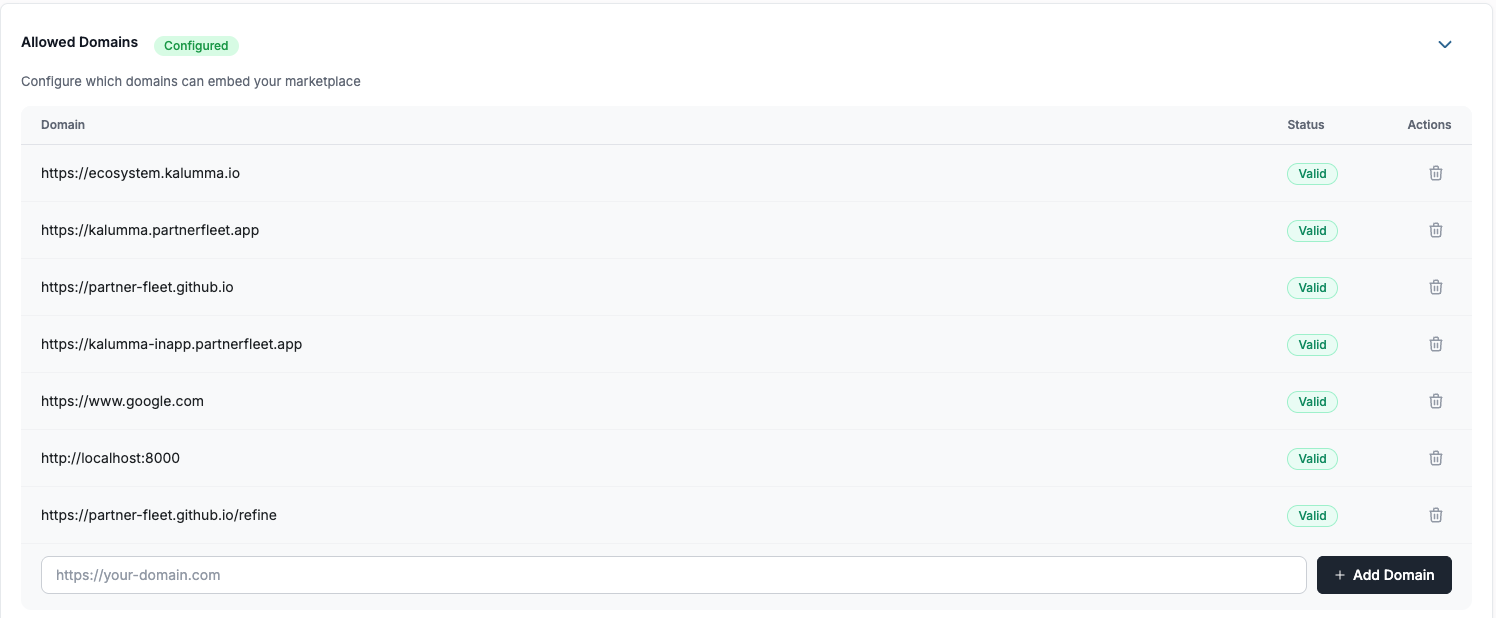
4: Add your domains to Allowed Domains
In the Allowed Domains section, enter any domains (and subdomains) that will be used to access or embed your marketplace (for example: your main website domain, help center domain, or any subdomain where the marketplace will live).
Partner Fleet will read the domains listed here to determine which domains are permitted, so any domain that should be allowed must be added to this section.
4. Testing & Validation (15–45 minutes)
After embedding, validate:
- Marketplace loads correctly inside the enablement platform
- Filters and categories behave as expected
- Internal-only content is visible only to intended users
- Desktop and mobile views render properly (if applicable)
5. Ongoing Updates & Maintenance (Light Lift)
Once live, ongoing effort is minimal:
- Partner content updates automatically reflect in the embedded marketplace
- New SPIFFs, enablement assets, or partner updates do not require re-embedding
- Filters and taxonomy can evolve as your partner program grows
No developer support is typically required for ongoing maintenance.
❓ Frequently Asked Questions
Do I need engineering support to embed this?
No. Embedding Partner Fleet is typically a non-technical task as long as your enablement platform supports iframe or embedded web content.
Can I use this in multiple tools (e.g., Seismic and Highspot)?
Yes. The same Enablement Marketplace can be embedded in multiple internal tools using the same or different embed configurations.
Will updates automatically appear in the embed?
Yes. All updates made in Partner Fleet are reflected automatically wherever the marketplace is embedded.
Best Practices
- Align filters to how sales teams already think and search inside their enablement tools
- Start with a focused set of enablement content (e.g., top strategic partners)
- Review and refresh SPIFFs and enablement assets on a regular cadence
🤝 Need Help or Want a Live Walkthrough?
If you have any questions, need help validating your setup, or would like to schedule a live configuration session, please reach out to your Partner Fleet Account Manager.
We’re happy to:
- Walk through your Enablement Marketplace configuration live
- Help you validate taxonomy, filters, and visibility rules
- Review your embed inside Seismic, Highspot, or other enablement tools
- Answer any questions before or after launch
Your Account Manager will help ensure your Enablement Marketplace is set up for success and aligned with your internal sales workflows.
Updated 9 months ago