

Oyster In-app Experience Widget Implementation Tutorial
Steps to implement the In-app Widget:
Add this code where you want to see your In-app:
    <partnerfleet-widget company="https://partners.oysterhr.com" apikey="apikeyexample"></partnerfleet-widget>
    <script type="module" src="https://widget.partnerfleet.io/oyster.js"></script>
Parameters
We have 2 required attributes on our code: company and apikey.
company and apikey.company = Your marketplace URL
For company, please use https://partners.oysterhr.com
apikey = Your CMS API key. Instruction to generate your API key are below.
We also have an optional parameter partnerid
partneridpartnerid = Deeplinking feature, partner slug
You can find the partner slug on the end of the URL of the main marketplace or on the partner listing edit page, on the Slug field.
If you add the partnerid attribute, the page will open with the designated partner listing. For this to work correctly, a logic needs to be implemented on your code in order to recognize that the partneridexists and is needed.
An Example implementation would be:
- If your app URL is https://oysterhr.app/solutions?partnerid=`airwallex`
- Then when rendering the script code you would add the partnerid as well:
<partnerfleet-widget company="https://partners.oysterhr.com" apikey="apikeyexample" partnerid="airwallex"></partnerfleet-widget>API Key Generation
- Login to Partner Fleet admin
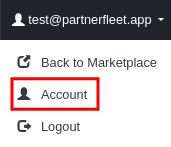
- Click on your email on the top right of your page, then on the dropdown click on "Account."
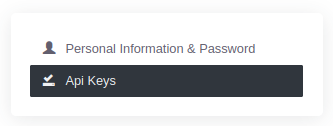
- Now, click on API Keys tab on the right sidebar.
- Create a new API Key or use any other that you have created before.
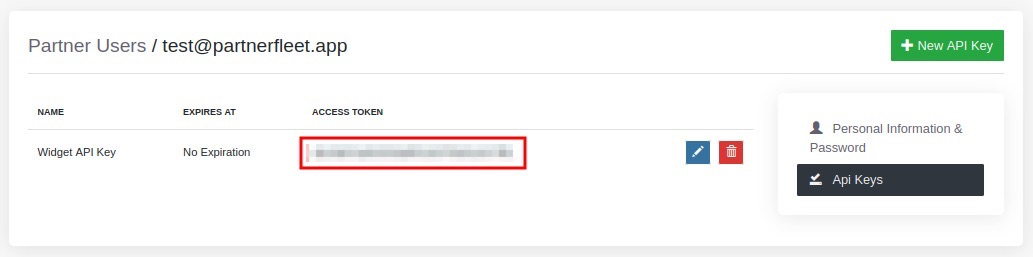
- Get the API Key Access Token
Congratulations!
Your in-app directory should be working right now. If it's not, please let us know and we will be happy to help!
Design updates
If any design updates are needed, feel free to ask our team and we will handle it. If it's easier for your team, you can send us a Figma file with the design requests so we can implement it faster and with more accuracy.
For example we can change the design of the sidebar, cards, sections, pagination, fonts, sizes and colors, to match Oyster's style (like we did on the main marketplace).